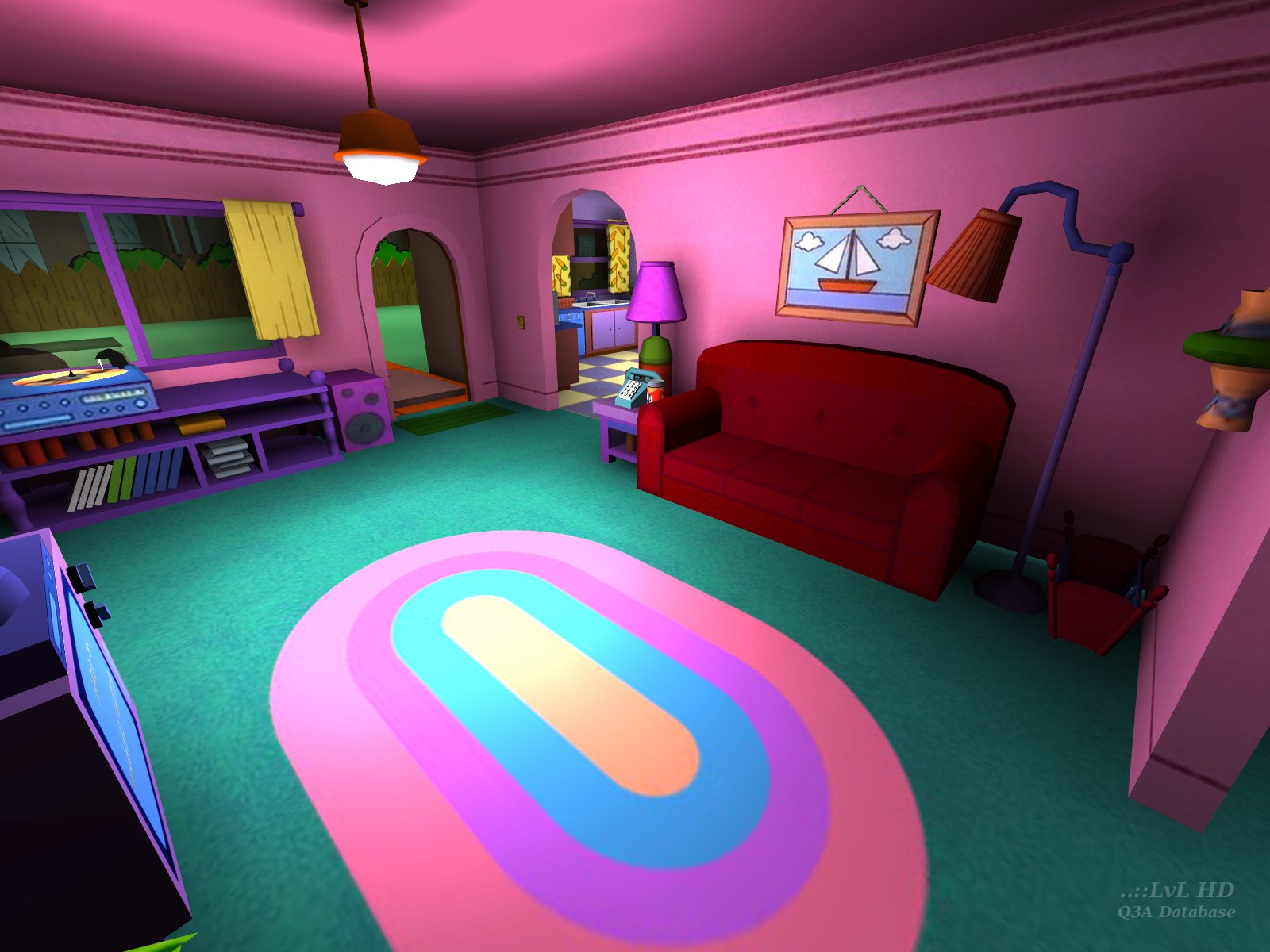

Maggu has created something that is absolutely outstanding in the eyes of not only the Quake 3 community, but also many other gamers. The video of the author showing the map currently has more than 2 million and 600 thousand views (youtu.be/34LtrnnXQTc) and it's hard to find a Q3 video that is more popular than this one. Maybe the famous video called "Fast Inverse Square Root — A Quake III Algorithm" by Nemean, which has more than 4 million and 600 thousand views right now.
I'm sure this map has helped a lot of people get (re)introduced to Q3 custom maps, maybe even Quake 3 in general and maybe even the entire Quake series. I think this is a Quake III analogue of Doom II's Doom Center or an old-school analogue for MyHouse.wad / My House. In conclusion, that is what happens when someone makes a high quality work of art at the collision of two already popular universes :) Undoubtedly, this is one of the first retro levels to show to those who say, "They didn't know how to make good maps back then" :]
EDIT: I was reminded that the map with the largest number of comments is actually Japanese Castles by G1zm0. The fact that I forgot about this map's popularity is quite ironic because this is one of my favorite maps too, and I had read all the comments for this release several months ago or so.
Edited 4.15 hours after the original posting.


I recommend removing all other PK3 except the the PAK*.pk3 files and try again with a lower screen size. Start at something really small like 640x480. Another option is to remove (or backup, rename) your q3config.cfg so you get a default set-up, then try again.
The fact that someone ran this map on a phone points to an issue at your end. It would be really nice to work out what that issue is as well.

@all others: This is pretty nice map and it's a shame that full map of Springfield is unplayable. I like most the pigtrails on the ceiling as it plays the most known soundtrack produced by Homer Simpson :D
I tried upping com_zoneMegs, it says it is latched, but never takes affect, even after quitting.



Holy sh*t!
If you get this error, then your issue is memory allocation related. The first thing to try is to add "+set com_hunkmegs 512" to your start command. I use IOQuake3 and have a heap of batch files depending on what I'm doing. Here is an example of one:
The "+set com_hunkmegs 512" part allocates at least 512 MB to "Virtual Memory" when IOQuake3 is started. Without "+set com_hunkmegs 512", only 64MB is allocated.
Try adding the command line switch and see if that helps.
If that does not help, could you state your video card details, model and memory size.


Also, a texture atlas for unique, non-tiled textures (such as pictures) could help the texture switching performance, and not only that but could help correct your non-power-of-2 texture artifacts by having your pages in the power of 2 (like pages of 512x512) so there's no odd rounding up of texels.
Edited: 19 Apr 2012 AEST

From readme:
Have you seen anything with "spiderpig" event?
....All you do is put the map file in baseq3. Is that really hard to do? (No offence) Anyway read the comment section below to understand why people have trouble with this map.
Edited: 31 Aug 2011 AEST
There is one secret place in chamber.
In readme file is written, and I quote:
I've shooted the pigtrails and nothing was happend (only plays spiderpig.wav in music folder, but nothing else).
Have you seen anything with "spiderpig" event?
OpenArena is a 'free' game based on the Quake 3 Arena source code, designed to be played as OA, a stand alone game. OA is NOT Q3A, it is OpenArena. If you want to play OA with Q3A content, that is total fine, but when you run into issues, only the OA people will be able to help you.
IOQuake3, however is NOT a stand alone game, but a modified (free) version of the Q3A engine, which has been designed as a replacement for Q3A. You still need Q3A to use IOQuake3, however OA works without Q3A - that is the difference.

However, yes, OpenArena is free to download, but you should be able to pick-up a full version Q3A for next to nothing both online through Steam or in a shop.
Update: I've removed a few very off-topic posts.
You may have some luck on the ATI forum here: forums.amd.com/game/index.cfm
GLW_StartOpenGL() - could not load OpenGL subsystem
BTW, If you you follow the link I posted below for the ATI drivers, there is a option to select your language before the download link - select English and you will download the English version of the drivers. More time reading and less time posting broken English messages will save you a lot of time.
lol
lol
Or you could just run ioquake3 - ioquake3.org/ - or any of the other alternatives available now.
lol
lol
lol
Also, these questions and more would be better suited to the Quake 3 World Forums at -> www.quake3world.com/
There are two map making programs for Quake 3 Arena, q3radiant and GTKRadiant.
q3radiant can be downloaded from id software's website:
www.idsoftware.com.../techdownloads/
Search through the "Quake 3 Arena" list until you see (in the "Title" column), "Q3A Tools", and the download link is across the page.
GTKRadiant 1.5.0 can be downloaded from:
icculus.org/gtkrad.../downloads.html
Search the page for the "GTKRadiant 1.5.0" section and underneath the "new and improved features" is the "downloads" section and the download link for GTKRadiant 1.5.0 is "Windows Installer".
PaN61
Edited: 19 Apr 2010 AEST
lol
PaN61
Tigs edit: The link was to an old id Software server that was not valid any more. Has been changed it to a ..::LvL link.
...please?
lol
"/cg_shadow 0", the bots and the player don't have a shadow and neither do the weapons, ammo boxes, health, armor and powerups.
"/cg_shadows 1" is the default setting.
"/cg_shadows 2", the bots have a shadow but the player doesn't and the weapons, ammo boxes, health, armor and powerups have a shadow.
"/cg_shadows 3", the bots and the player have a realistic shadow but the weapons, ammo boxes, health, armor and powerups don't have a shadow.
PaN61
lol
lol
lol
It wasn't What I said I thought It was, It was The Principal:Skinners With a Sign saying: "Hi! I' M BIG BUTT SKINNER" on it. So you can already guess it wasn't that.
lol
This procedure worked for me.
PaN61
Edited: 28 Mar 2010 AEST
The pk3 file is simpsons.pk3, but the bsp file (the compiled map within the pk3) is called simpsons_q3.bsp and that is what you need to use on the console.

Read Tigs very important notes and the map readme - this will help you.
It's a damn fine map but you need a lot of players to have real fun with it. I think that this will hit the 30'000 d'loads in a few weeks!!!
konsola simspsons_q3 yazdıgımda bolüm açılmaktayken tekrar ana menüye geri dönüyor YARDIM!!
wish you all a happy new year
cheers
Maggu
thk u
...and now??? i don't understand how to lunch this map...
yes, yes, i'm a noob of quake, but try to understand me!!!!
please write all what i need to do!!!!
so my questions are:
THANK U
Cheers
Maggu
The screenshots and video were all done with this version, using IOQuake3 - ioquake3.org/ - on a Pentium D 2.80GHz CPU with both 1GB of RAM and 3GB of RAM. It worked fine both times.
The commandline I used to start Q3 in a batch file is as follows:
start ioquake3.x86 +set fs_homepath e:\ioquake3 +set sv_pure 0 +set r_fullscreen 1 +set r_mode 6 +map ""
Then I used the Skirmish menu to start the map. Nothing special at all. If you are having issues, the problem must be at your end.
Or read this thread. ;-)
How to solve it out?
Z_Malloc: failed on allocation of 4194328 bytes from the main zone
any ideas?
Respect
best with SImpsons player models
mmmm donuts
D'OH!
If you have heaps of RAM however, you have another problem, and if you have Vista - well, you may be on your own :]
I suggest trying this map with ioquake3 - ioquake3.org/ - works without a problem here.
just wanted to mention that Bart's and Lisa's school is not part of the map.
Perhaps you muddled up the police station with it, because of the school bus parking behind it....
anyway, Thank you all.
THIS WEBSITE IS GREAT!
ErasureMode@msn.com

Loading...
Search for a map.
Results will appear here.